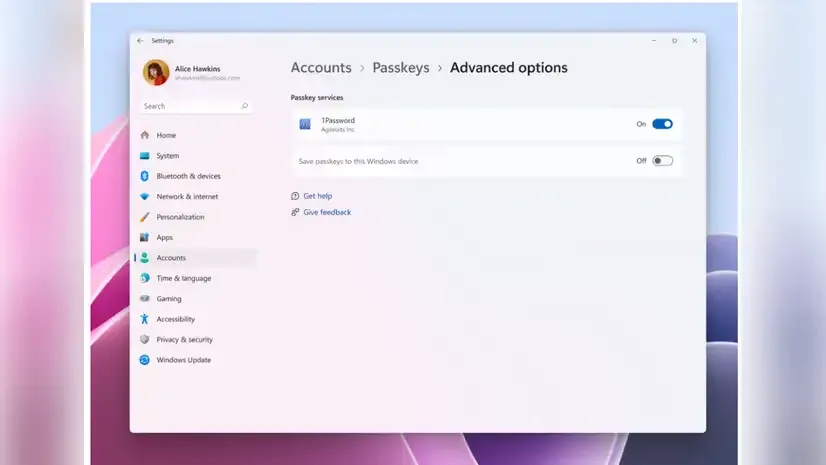
Microsoft has unveiled a significant update to its Windows 11 Insider Preview Build for the Dev Channel, reinforcing its commitment to a secure, password-less ecosystem. The latest build introduces native support for passkeys in partnership with 1Password, enabling seamless biometric authentication through Windows Hello. This shift toward passkey integration is designed to replace traditional passwords with a more secure and user-friendly alternative. In addition, the build includes UI refinements, region-specific settings improvements, and updated version labeling ahead of the 25H2 feature release. The move reflects Microsoft’s long-term strategy to simplify identity verification while enhancing cybersecurity resilience across Windows platforms.
Passkeys with 1Password: Ushering in a New Era of Authentication
Microsoft’s new Windows 11 Dev Channel build marks a transformative step in digital identity management. Central to this update is the integration of passkey functionality with 1Password, the widely used password manager. Passkeys utilize public key cryptography and biometric verification to eliminate the need for traditional passwords—often the weakest link in digital security.
The collaboration allows users to create and manage passkeys directly within 1Password and use them via Windows Hello—Microsoft’s biometric authentication suite. This capability ensures that Windows 11 users can log in to supported websites with face, fingerprint, or PIN verification, reinforcing both ease of use and identity protection.
How to Enable Passkeys on Windows 11 Dev Build
To access the new passkey functionality, users must install the 1Password beta and activate support via system settings. The steps are as follows:
- Ensure your Windows 11 device is on the latest Dev Channel build.
- Install the 1Password beta version.
- Navigate to Settings > Passkeys > Advanced Options.
- Enable the plugin credential manager.
- Activate biometric verification via Windows Hello.
Once enabled, passkeys can be used for signing into compatible services or saved for future access during website registration—eliminating the need to memorize or manage complex passwords.
Microsoft’s Vision for a Password-less Future
This development is a critical part of Microsoft’s broader strategy to phase out passwords entirely. Passkeys offer a more secure, phishing-resistant, and user-friendly method of authentication, aligning with standards established by the FIDO Alliance and World Wide Web Consortium (W3C).
By incorporating passkey support into its operating system, Microsoft is not just responding to evolving cybersecurity threats but also anticipating a paradigm shift in how users interact with digital services. This initiative further underscores the tech giant’s intention to lead the industry in identity innovation.
Other Updates in the Latest Dev Build
Beyond passkey support, the updated Dev Build brings incremental but noteworthy enhancements:
- Version Label Update: The build is now marked as 25H2, indicating it is part of the annual feature update slated for release in the second half of 2025.
- Voice Access Adjustments: Japanese voice access has been temporarily disabled due to unresolved bugs. Microsoft has stated that the feature will be re-enabled after further refinements.
- Regional Settings for EEA Users:
Following changes introduced in Build 26200.5603, users in the European Economic Area (EEA) can now modify their default browser directly through Windows Settings. Additional updates include:- Automatic pinning of the new browser to the Taskbar and Start Menu.
- Option to opt-out of pinning during the browser change process.
These adjustments reflect Microsoft’s compliance with regional regulatory frameworks and its responsiveness to user demands for transparency and customization.
Conclusion
Microsoft’s push toward passkey adoption in Windows 11 is a strategic and timely leap into the future of cybersecurity. By removing the vulnerabilities of password-based systems and embracing biometric verification, the company not only enhances user safety but also simplifies the authentication experience.
The partnership with 1Password underscores the importance of ecosystem collaboration in delivering secure, interoperable solutions. As the 25H2 release nears, Microsoft is poised to lead a broader industry transition toward frictionless, identity-first computing.
Comments